For Educators
Real history, played out on a real map. Your class watches a historical event unfold year by year, stops at discussion questions along the way, then takes over a side to see what could have changed.
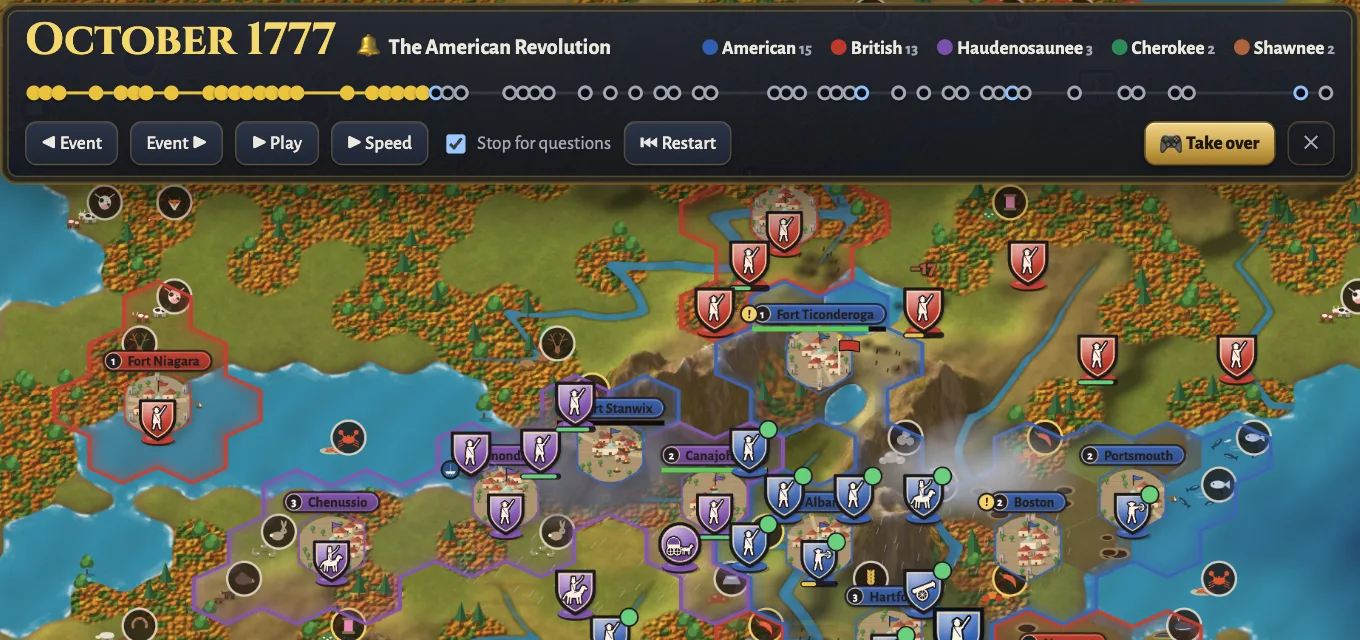
What it is
EmpireWright is a strategy game in the browser. Its History scenarios turn it into a teaching tool: each one draws a real region from real coastlines, rivers and mountains, places the real realms and cities of the time, and lets the events happen on their dates.
- 📺 Watch it happen. The computer plays every side. Each event arrives with a narrator's card: who, what, where and why. The class stops at discussion questions, and you control the pace.
- 🎮 What if? Students take over one side at a turning point. History's wars still come on their dates, but who wins is decided on the map. At the end they compare their history with the real one.
Find it in the game under ☰ Menu → 🏛️ History.
The scenarios
⚔️ The Punic Wars, 264 to 146 BC Free
Rome and Carthage fight three wars for the western Mediterranean: Sicily, Hannibal's march over the Alps, Cannae, Zama and the fall of Carthage. 42 events, 8 discussion questions. Grades 6 to college.
🔔 The American Revolution, 1775 to 1783
From Lexington to Yorktown and the British leaving New York, with the French alliance, the Haudenosaunee, Cherokee and Shawnee nations, and the Black soldiers and Loyalists who fought for freedom. 74 events, 9 discussion questions. Grades 5 to college.
🧭 The Age of Exploration, 1453 to 1549
Portugal sails around Africa to India, Castile crosses the Atlantic, and the peoples of Africa, the Americas and the Indian Ocean meet them: Columbus and the Taíno, da Gama, Magellan, the fall of the Aztec and Inca empires, the Columbian Exchange and the beginning of the Atlantic slave trade. 56 events, 10 discussion questions. Grades 6 to college.
🎖️ The American Civil War, 1861 to 1865
From Fort Sumter to Appomattox and Juneteenth, one month at a time: Antietam, the Emancipation Proclamation, the United States Colored Troops, Harriet Tubman's raid, Gettysburg and Vicksburg, Sherman's march and the Thirteenth Amendment. 38 events, 8 discussion questions. Grades 5 to college.
🪖 World War I, 1914 to 1919
From the shots in Sarajevo to the Treaty of Versailles, one month at a time, on a map of Europe and the Middle East: the trenches of the Western Front, the Eastern Front, Gallipoli, the Armenian Genocide, the Arab Revolt, the Russian Revolution, the United States' entry and the armistice. Each army wears its own uniform and helmet, and the real trench lines appear on their dates. 43 events, 9 discussion questions. Grades 6 to college.
✈️ World War II in Europe, 1939 to 1945
From the invasion of Poland to V-E Day and the surrender of Japan, one month at a time: the fall of France and Free France, the Battle of Britain and the Blitz, Operation Barbarossa, the siege of Leningrad, Stalingrad, El Alamein, D-Day, the liberation of Paris and the fall of Berlin. The Holocaust is told in the narration with care and accuracy, from the ghettos and Babi Yar to the Warsaw Ghetto Uprising and the liberation of Auschwitz. It is never part of the play. Each army wears its own helmet, from the American M1 to the Soviet SSh-40. 44 events, 9 discussion questions. Grades 7 to college.
🌊 World War II in the Pacific, 1937 to 1945
From the Marco Polo Bridge to the surrender in Tokyo Bay, one month at a time, on a map from Burma and Manchuria to Hawaii: the war in China and the Nanjing Massacre, Pearl Harbor, the fall of Singapore and the Philippines, the Bataan Death March, Midway, Guadalcanal and the Kokoda Track, island hopping, Iwo Jima and Okinawa. The incarceration of Japanese Americans, forced labor, the "comfort women" and the atomic bombings of Hiroshima and Nagasaki are told in the narration with care and accuracy, and the class discusses the decision to use the bomb. Each army in its own helmet, from the Japanese Type 90 to the Australian slouch hat. 45 events, 10 discussion questions. Grades 7 to college.
🇰🇷 The Korean War, 1950 to 1953
From the North's invasion in June 1950 to the armistice at Panmunjom, one month at a time, on a map of the Korean peninsula and its borders: the Pusan Perimeter, the Incheon landing, the march to the Yalu and China's entry, the Chosin Reservoir and the Hungnam evacuation, Seoul changing hands four times, MacArthur's dismissal, the battles for the hills, the prisoner-of-war question and the armistice that still divides Korea. The killing of civilians by every side is told with care in the narration. 24 events, 5 discussion questions. Grades 7 to college.
Coming next: the Vietnam War and wars of European history. Every new scenario is included in the Classroom License.
A lesson plan (one class period)
- Before class (10 minutes). Open empirewright.com/play on the computer connected to your projector and sign in. Open ☰ Menu → 🏛️ History and press 📺 Watch it happen once to see how it runs. Keep Stop for questions checked.
- Set the scene (5 minutes). Show the map before you press Play. Name the realms in the bar at the top and find their cities. Ask what students already know about the period.
- Watch (20 to 25 minutes). Press ▶ Play. Pause whenever you like, change the speed, or use ◀ Event and Event ▶ to go back to an earlier card. The timeline dots show where you are.
- Discuss. When a discussion question appears, history waits. Use think-pair-share, a quick write or a whole-class talk, then press Continue.
- What if? (homework or a lab period). Students choose a side and a turning point and play it out. Ask them to note one decision that changed their outcome and one thing that happened anyway.
- Reflect. At the end, the game shows how their history turned out next to what really happened. That comparison is a strong prompt for a written reflection.
Assessment
EmpireWright does not collect or grade student work. Assign the discussion questions and a reflection in your learning management system or on paper, and grade them the way you grade any other assignment. Some prompts that work well:
- Choose one discussion question and answer it in a paragraph, using two events from the scenario as evidence.
- In What if?, what did you change, what happened because of it, and what happened anyway? Why?
- Pick a realm that lost. What could it have done differently, and what was out of its control?
- Retell one event from the point of view of a different people in the scenario.
Accuracy
Every event is dated and checked against standard textbooks and published histories. Each scenario tells the story from more than one side, including peoples who are often left out, such as Native nations and enslaved people.
Some things are simplified so the story fits on a map, and it helps to tell students so:
- In Watch mode, cities change hands on their real dates. The armies on the map show where the fighting was, not exact numbers of soldiers.
- One realm sometimes stands for a group of peoples. In the American Revolution, for example, the Haudenosaunee realm stands for the nations of the Confederacy that fought beside Britain, while the narration tells of the Oneida, who fought with the Americans.
- Distances and borders are drawn on a hex grid, so small places can sit a hex away from their real spot.
Accessibility
- Every History control works from the keyboard, and screen readers read each new event aloud.
- The game respects your device's reduced-motion setting, and the camera then jumps instead of gliding.
- The game and every scenario are in English, Spanish, Portuguese, French and German, which helps English learners and world-language classes.
Privacy
In Watch mode the class follows along on your screen, so students need no accounts and share no information. If students play What if? on their own devices, each needs a free EmpireWright account. For students under 13, use Watch mode on your screen. See our privacy policy.
Try it free, then license it
Start your trial or buy the license in the game: ☰ Menu → 🏛️ History, or the 🛒 Store. Buying for several teachers or need an invoice for your school? Email [email protected].
What you need
- A computer with a current web browser (Chrome, Edge, Firefox or Safari) and a projector or large screen. Nothing to install.
- For What if? on student devices: Chromebooks, Windows PCs, Macs and tablets with a current browser.
- Something not working? Our Help page has fixes for the most common problems.